Settings
 Fast Delivery
 Free Shipping
 Incoterms
 Payment Types


 Marketplace Product

Common Website Vulnerabilities and How to Fix Them
2026-05-13 | By Andrew Kazour
Web development opens the door to creating awesome tools, websites, and personal projects! However, it can be a bit overwhelming trying to figure out how to keep your site secure while building it. Security depends on more than just having a login page with a username and an encrypted password. The way you handle user input, manage files, and structure your database queries directly affects your site's safety. Here are the most common vulnerabilities you’ll run into and how to fix them. I found these on my test website and will explain how I found them and how to resolve them.
Directory Traversal Vulnerability
Directory traversal happens when an attacker can trick your website into letting them look at files they shouldn't be able to see, like system files or passwords.
How it was found: While checking out how a site loads files, I noticed the backend used a simple parameter to grab files. By adding "dot-dot-slash" (../) to the URL, I could "jump" out of the intended folder and look at the rest of the server.
- Payload: https://example.com/api/files.php?file=../../../../home/flag.txt
- Result: The server happily handed over a secret file because it didn't check if I was allowed to leave the "files" folder.
Redemption Strategy: You should always validate and sanitize file path inputs. The best way to do this is with an allowlist to only let the code access a specific, predefined directory. If a request contains ../, reject it immediately. User input should never be used to build a direct path to your server's files.
SQL Injection (SQLi)
SQL Injection is a classic. It happens when user input is inserted directly into a database query without being cleaned first. This lets an attacker "talk" directly to your database.
How it was found: I found that a user lookup field was just pasting whatever I typed into a SQL query. By using UNION SELECT statements, I was able to trick the database into showing me every table it had, including a "secrets" table with hidden flags.
- Example Payload: ' UNION SELECT username, email, password FROM users#
 This payload loads all users in the directory, which isn't supposed to happen in this directory. This could be switched with some injection that could look at other tables in the database and get more information.
- Result: Instead of just looking up one person, the site displayed every user's private credentials.
Redemption Strategy: A good fix here is using prepared statements or parameterized queries. This treats user input as "data" rather than "code," so the database won't execute it. Also, you have to make sure your database user has minimal privileges and never show raw database errors to the public.
Cross-Site Scripting (XSS)
XSS is all about injecting malicious scripts (usually JavaScript) into a webpage so they run in another user's browser. There are three main types:
- Stored XSS: The script is saved on the server (like in a comment section). Every time someone views that comment, the script runs.
- Reflected XSS: The script is part of a URL or search query and is "reflected" back to the user immediately.
- DOM-Based XSS: The vulnerability exists entirely in the client-side code, where JavaScript handles input unsafely.
Payload used: <img src=x onerror=alert('XSS')>
 At the bottom, you can see a comment with a PNG image in it. That image PNG indicates it can't find the proper image, so it is running the script I put there, which is an alert error you can see at the top. This is a harmless script, but people could add more nefarious ones.
Redemption Strategy: You need to filter out all user-generated content before it hits the page. This means turning characters like < into < so the browser doesn't think it's a piece of code. Avoid using innerHTML in JavaScript; use textContent instead. Implementing a strong Content Security Policy (CSP) is also a great extra layer of defense. These are very basic attacks that most people could do with minimal effort, so you need to make sure you can fight against them.
Replay Attacks (Session Management)
This is a weakness in how a site remembers who you are. If a site relies on a single cookie that never changes or expires, an attacker can just steal that cookie and "replay" it to log in as you. Most websites nowadays have a changing cookie every time you log in, but if you are new to this, then you might make this mistake.
How it was found: I logged in, grabbed my session cookie from the browser settings, and then opened a completely different browser in an incognito tab. I then pasted the cookie in and was about to log in instantly without needing a username or password.
- Result: The server didn't realize the "session" was being reused on a different browser.
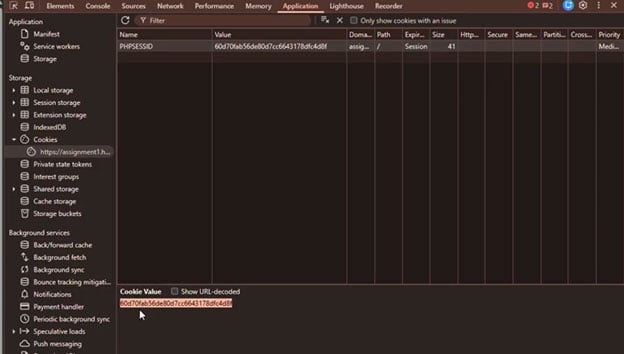
Copying this cookie into your own cookies when accessing the webpage on a different device gives you access to the webpage without having to log in. Anyone can do this attack without much knowledge of vulnerabilities, so you should protect yourself against this. This one is fairly easy to protect yourself against, however.
Redemption Strategy: Your app should regenerate session IDs every time someone logs in. Make sure your cookies are marked as "Secure" (only sent over HTTPS) and "HttpOnly" (can't be read by JavaScript). You should also set sessions to expire after a certain amount of time and invalidate them immediately when a user hits "Logout".
Conclusion
Securing a website isn't just about thinking it's secure enough because there aren't any obvious problems. It’s a mix of smart input validation, using modern coding libraries, and thinking like an attacker. By staying on top of these common issues, you can build sites that don't just work well but stay safe for everyone who uses them. These are just 4 common vulnerabilities that are some of the easiest to use but also fairly easy to protect yourself against. Make sure your web applications are up to date and can withstand these attacks.